Lindy AI review: we tested it in Slack, on research and on routines
Published June 28, 2026 · Updated October 19, 2026 · by Jonathan Hildebrandt
The short version
We gave Lindy 11 real jobs on October 19, 2026. It got 13 of 13 Slack facts right, got 75 of 86 researched prices right, and most tasks cost 5 to 16 credits (5 to 16 cents). It also confirmed a reminder it never sent. Current pricing, real cost per task, and who should buy.
Pros
- ✓Read Slack with no misses in our test: 7 of 7 facts from a 12-message thread in about 14 seconds, and 6 of 6 from a 150-message channel, including 3 facts that changed mid-conversation (Pondero Labs test, October 19, 2026)
- ✓Bounded tasks are cheap: most of ours used 5 to 16 credits, about 5 to 16 cents at 29.99 USD per 3,000 credits (Pondero Labs usage page; Lindy's pricing page)
- ✓Fast, sourced price research: 65 of 73 rows fully correct across 20 AI tools, each with a source URL, and three of four batches finished in 14 to 66 seconds (Pondero Labs price-check test)
- ✓Free start with no card: 50 USD in credits for 7 days (per Lindy's pricing page), and a weekly routine set up in one click from a suggestion (Pondero Labs routine test)
Cons
- ✕Confirmed a 3-minute Slack reminder and never sent it; nothing appeared in the thread, the channel, the Lindy DM or Activity 10 minutes later (Pondero Labs Slack test)
- ✕Every price error we found was a billing-period error, on pages that default to annual billing or show euros: Make, Notion, Grammarly and n8n (Pondero Labs price-check test)
- ✕One open-ended research request ran more than 15 minutes and used 241 credits, about 2.41 USD, with no estimate before it started (Pondero Labs usage page)
- ✕Anyone who @mentions Lindy in Slack takes a billed seat after a 7-day trial, and monthly credits do not roll over (per Lindy's pricing page)
Lindy AI review: we tested it in Slack, on research and on routines
On October 19, 2026 we gave Lindy 11 real jobs from a trial account and a free Slack workspace: answer questions from Slack threads, research prices across 23 AI tools, set a reminder and run a scheduled routine. It read Slack threads without a miss, and most research batches finished in about a minute. The one thing it promised to do later, a reminder, never arrived.
- Slack recall: 13 of 13 facts. 7 of 7 from a 12-message thread in about 14 seconds, 6 of 6 from a 150-message channel, including all 3 facts that changed mid-conversation.
- Price research: 75 of 86 rows correct. Every miss was a billing-period mix-up on a page that defaults to annual pricing or shows euros.
- Cost: 5 to 16 credits for a typical task, about 5 to 16 cents. One open-ended research request ran more than 15 minutes and used 241 credits.
- Reliability: one silent failure. Lindy replied "Got it, I'll ping you here in 3 minutes" and never did.
Buy Lindy if your team runs on Slack and wants an assistant that can answer "what did we decide, who owns it, when is it due" from a long thread, or if you want quick, sourced research tables. Wait if you need reminders and scheduled routines you can rely on without checking, or if a large Slack workspace will @mention it casually, because every person who does becomes a billed seat. Our rating is 4.0, down from 4.2 in September.
The detailed write-ups: Lindy in Slack, tested, how accurate AI agents are at pricing research and setting up a Lindy routine. Our tool profile lives at /agents/lindy/.
What Lindy is now
Our September review described two products: a personal assistant on its own plans and a Slack "Teammate" priced per seat. Lindy has since folded them together: its pricing page now sells one product with three tiers: Free, Team and Enterprise. The Slack teammate, inbox management, meeting notes, scheduled routines and iMessage access are all listed as included.
The app is now chat-first: an "Ask Lindy anything" box, with Meetings, Memory, Routines, Skills and Integrations in the sidebar, and suggestions written for your business.
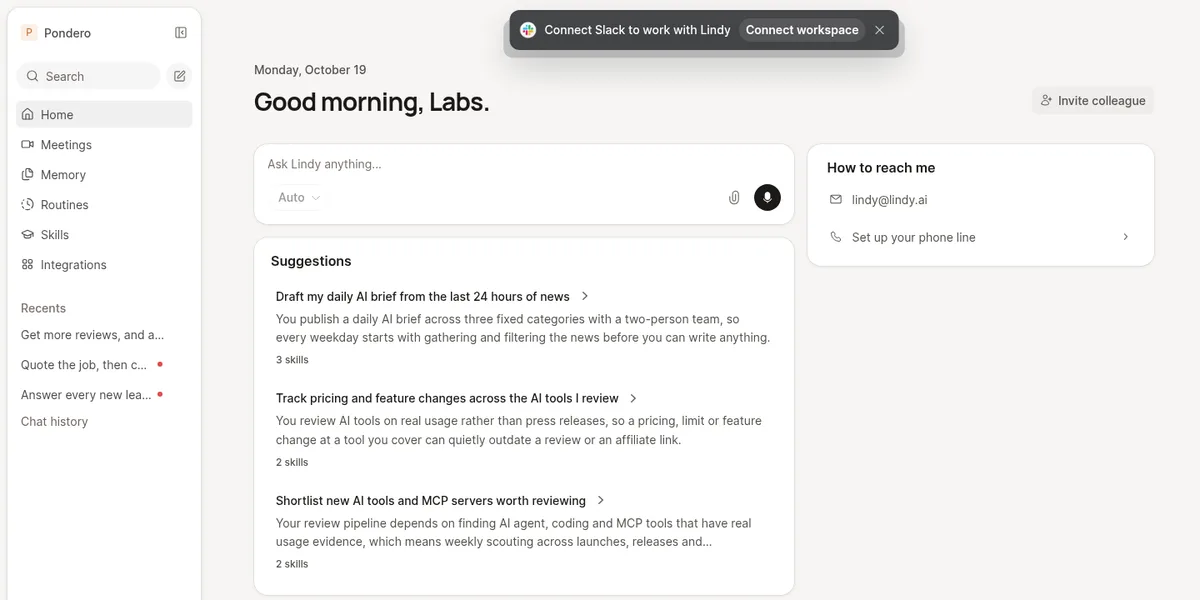 Our test workspace, captured October 19, 2026.
The scorecard: every test we ran
| Task | Result | Time | Credits | Cost |
|---|---|---|---|---|
| Price lookup: Cursor, Zapier, n8n | 10 of 13 rows correct; n8n converted from euros | ~47 s | 5 | ~$0.05 |
| Price research A: Copilot, Claude, ChatGPT, Perplexity, Windsurf | 30 of 31 correct, 1 partly | 15+ min | 241 | ~$2.41 |
| Price research B: Make, Gumloop, Relevance AI, Relay.app, Pipedream | 8 of 12 correct, 1 partly, 3 wrong (all Make) | 66 s | 16 | ~$0.16 |
| Price research C: Exa, Tavily, Firecrawl, Apify, Browserbase | 17 of 17 correct | 14 s | small* | <$0.17 |
| Price research D: Notion, Grammarly, Jasper, Otter.ai, Fireflies.ai | 10 of 13 correct, 3 partly | 15 s | small* | <$0.17 |
| Slack: summarize a 12-message thread | 7 of 7 decisions, owners and dates | ~14 s | small* | <$0.17 |
| Slack: trick and bait questions | 2 of 2 correct, no invented answers | seconds | 3 (bait) | ~$0.03 |
| Slack: "remind me in 3 minutes" | Confirmed, never delivered | n/a | 6 | ~$0.06 |
| Slack: LinkedIn draft, facts only | Partial: left out the decided Oct 29 date | seconds | small* | <$0.17 |
| Slack: 150-message channel recall | 6 of 6, all 3 changed facts flagged | ~1 min | 12 | ~$0.12 |
| Routine: weekly pricing digest, dry run | Set up in one click; dry run did nothing | 96 s | 9 | ~$0.09 |
*Lindy's usage page itemizes the biggest tasks; the smaller ones above shared 17 credits between them.
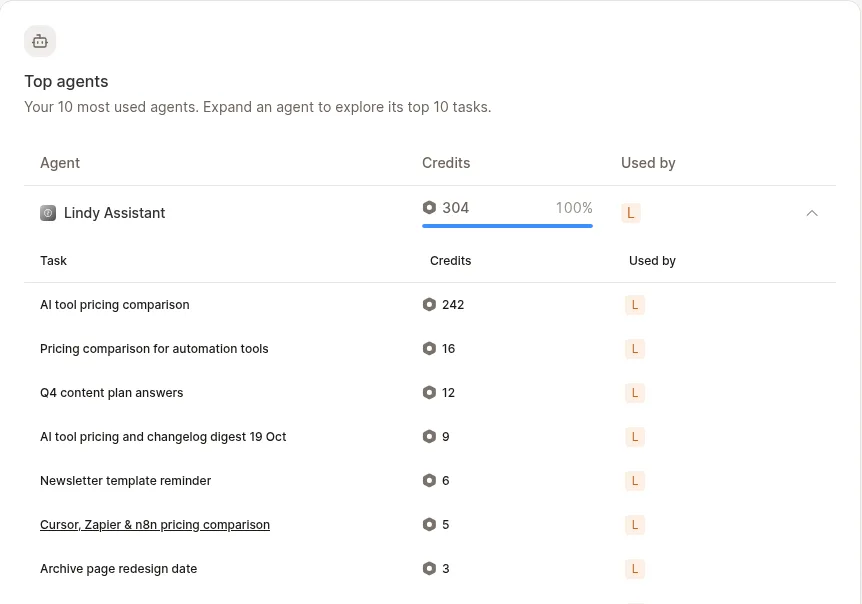 Our test workspace, captured October 19, 2026. The long research task had ticked from 241 to 242 credits by the time of this capture.
Lindy pricing, and what a task really costs
| Plan (Lindy's pricing page) | Price | Credits | Notes |
|---|---|---|---|
| Free | $0 | $50 in credits | No card, credits last 7 days |
| Team | From $29.99/mo per active user | 3,000 a month | Tiers up to 1,750,000 credits for $9,999.50; pooled across the team; no rollover |
| Top-up | $10 | 1,000 | Top-up credits do not expire |
| Enterprise | Custom | Custom | HIPAA with BAA, SSO, SCIM, audit logs |
Three rules on Lindy's pricing page decide the real bill. Every active user is billed, from $29.99 a month for 3,000 credits each. Anyone who uses Lindy or @mentions it in Slack takes a seat, with a 7-day trial for Slack joiners. Monthly credits do not roll over.
A credit costs about one cent: $29.99 buys 3,000, and top-ups are $10 per 1,000 (per Lindy's pricing page). Lindy's guide puts everyday asks at 2 to 250 credits, deep work at 250 to 1,000 and big builds at 1,000 to 2,500. Our bounded tasks sat at the low end, costing 5 to 16 credits, so one 3,000-credit seat covers roughly 190 of them. The 241-credit research run alone would eat 8 percent of that month.
Our trial account showed 5,000 credits, a billing period ending the next day and no card on file. Connecting Slack added another $10 in credits. Overages are off by default; switched on, they let you keep working up to four times your subscription at twice the credit price.
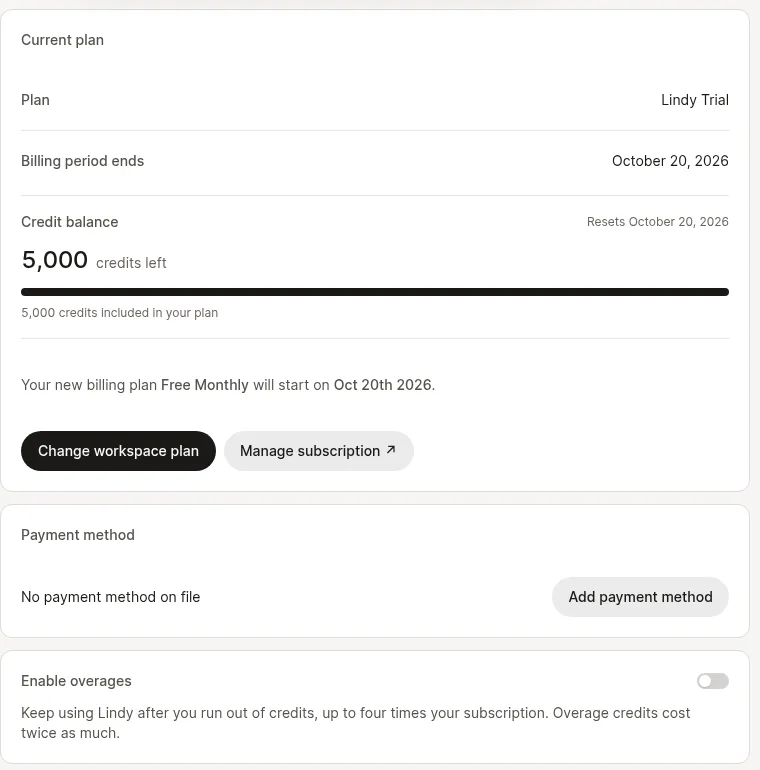 Our test workspace, captured October 19, 2026.
One accounting quirk: the credit badges in chat ran lower than the billing pages. Our first lookup showed 2.0 credits in chat, while the balance dropped by 5. The routine dry run showed 1.8 in its run view and 9 on the usage page. Budget from the usage page.
Where Lindy shines: reading Slack
We wrote a realistic 12-message planning thread between two teammates, with decisions, owners, dates and one open question, then asked Lindy to summarize it. It replied in the thread about 14 seconds later with all 7 facts right and a note that it had read "the fetched window of the channel, which may be partial". Asked whether we had decided LinkedIn timing, it said "No, it's still open" and quoted the message. Asked for an exact archive launch date that was never set, it said none was set and that the work had moved to November, rather than inventing one.
The harder test was a 150-message channel where three facts changed partway through: a video budget rose from $1,200 to $1,800, a guide's due date moved from November 6 to November 13, and a vendor call moved from Wednesday October 28 at 2 PM to Thursday October 29 at 11 AM. Lindy got 6 of 6 questions right, gave the current value each time and flagged each change, in about a minute for 12 credits.
Lindy vs Slack AI. We wanted a head-to-head, but on a free Slack workspace Slackbot's AI sits behind an "Upgrade Now" screen. Lindy worked on free Slack; Slack's own AI needs a paid Slack plan before it answers anything. Prompts, answer keys and every reply are in our Lindy Slack test.
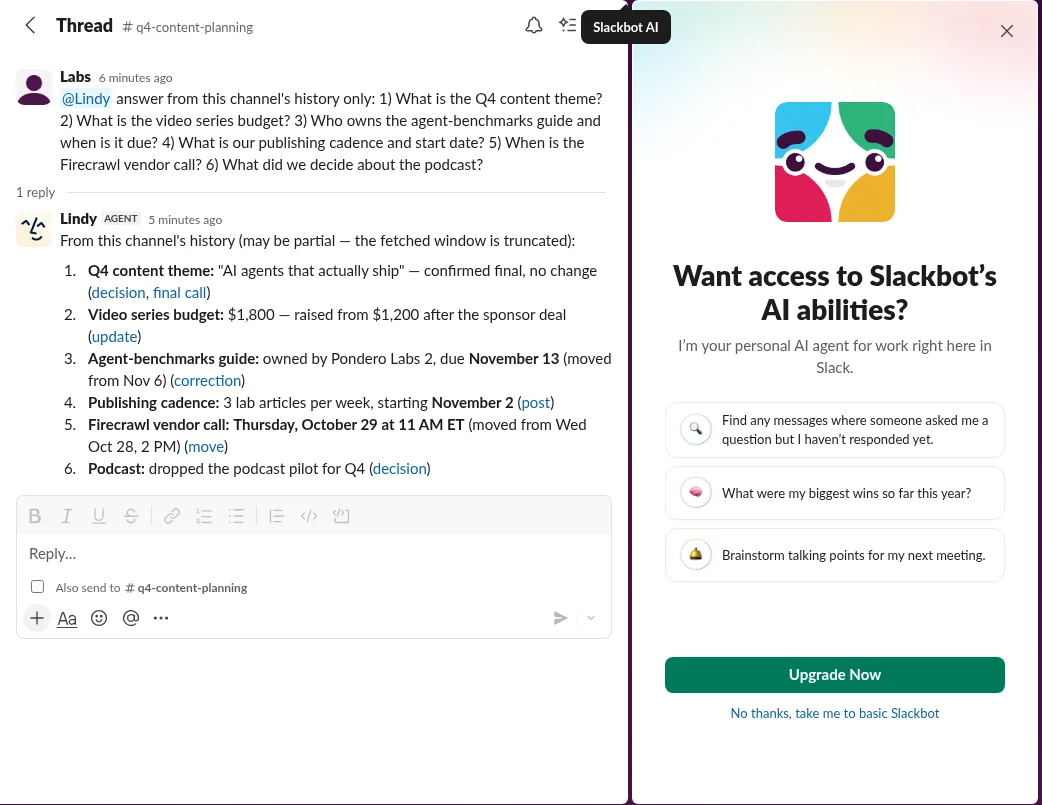 Our test workspace, captured October 19, 2026.
Where Lindy slipped
A reminder it confirmed and never sent
We asked Lindy in Slack to remind us in 3 minutes. It answered "Got it, I'll ping you here in 3 minutes (12:27 PM)" and charged 6 credits. About 10 minutes later there was nothing in the thread, the channel, the Lindy DM or Slack's Activity tab. A confirmed task that silently fails is worse than a refusal, because you stop checking. Keep time-critical reminders in Slack itself for now.
Annual prices labeled as monthly
Across 86 price rows, Lindy got 75 fully right. All of its mistakes came from billing periods. On Make, whose page defaults to annual billing, it reported $9, $16 and $29 for plans that cost $12, $21 and $38 billed annually or $16, $28 and $51 monthly, matching neither toggle. It labeled Notion's yearly rates as monthly, called Grammarly's annual-plan rate of $12 monthly, and converted n8n's euro prices instead of reading the US page. Ask for both billing periods and the currency in your prompt, and spot-check annual-default pages. The row-by-row check is in our pricing research accuracy test.
The 241-credit research task, and how to cap it
Three of our five-tool research batches finished in 14 to 66 seconds. Batch A, where Lindy reported a bot wall on OpenAI's pricing page and found only annual prices on Perplexity's, kept working for more than 15 minutes and used 241 credits, 15 times our next-largest task. We saw no cost estimate before it started. To keep a runaway job from draining a shared pool: leave overages off, have an admin set per-seat credit allocations (Lindy says it then pauses and tells you when the pool runs low, per its pricing page), give research prompts a fixed list of sources, and stop any task whose "Worked for" timer passes a few minutes.
Every Slack mention is a seat
Lindy's seat rule is generous to try and expensive to forget. A 20-person channel where everyone tags Lindy once becomes 20 seats after the 7-day trial, at least $599.80 a month at $29.99 each (per Lindy's pricing page). Removed seats stay active through the paid cycle with no proration. Decide who should use it before you add it to busy channels.
A draft that dropped a decided date
Asked for a LinkedIn post using only facts from the thread, Lindy invented nothing, but it left out the October 29 relaunch date the team had agreed. It confused "LinkedIn timing is open" with "the launch date is open". Read drafts against the thread before posting.
Setup notes
Signup takes an email address and no card. Then:
- Invite Lindy to the channel first. Our first @mention got a Slackbot notice that Lindy was not in the channel. Running
/invite @Lindyfixed it. - Routines start from suggestions. One click on "Track pricing and feature changes across the AI tools I review" created a Monday 8:00 AM ET routine with instructions written by Lindy, using Exa search and page fetches, and sending a digest only when something changed.
- Give a routine its inputs. The dry run searched Lindy's file storage for our list of reviewed tools, found none and sent nothing. Paste the list into the instructions. The step-by-step is in our Lindy routine setup guide.
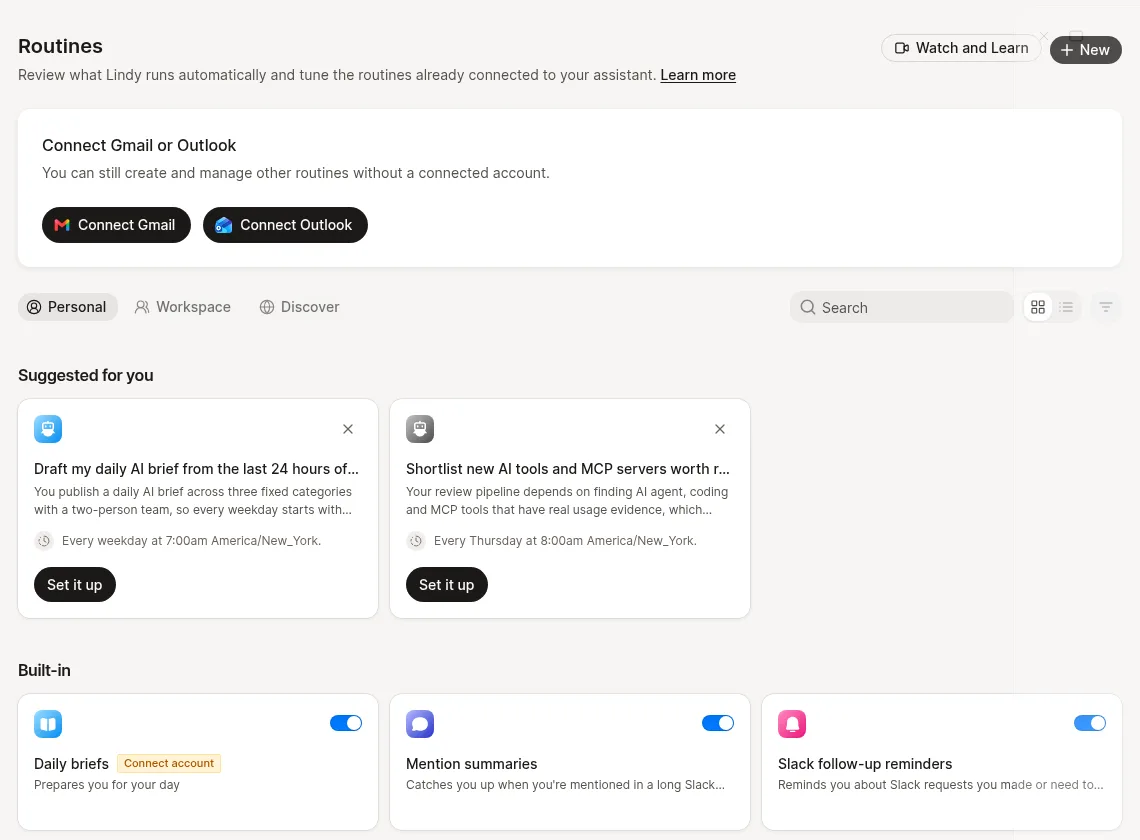 Our test workspace, captured October 19, 2026.
One pricing-page inconsistency to raise with sales: the Team tier lists "Computer use", while the "everything included" list says "Computer use on Pro and Max", tiers that no longer appear on the page (Lindy's pricing page, October 19, 2026).
What this test does not show
- One day, one account. Every run happened on October 19, 2026, on a trial account, and each task ran once.
- Free Slack, synthetic threads. Our two Slack conversations were written for the test, realistic but not a real team's history, and Slack AI could not be compared on a free workspace.
- No inbox, calendar, meetings or computer use. Those features were outside this round.
- Credits are Lindy's numbers. We read them from its usage and billing pages, which disagreed with the chat badges.
Is Lindy worth it?
- A Slack-first team that loses decisions in threads. Buy it. Recall was flawless in our tests, and each answer cost cents.
- Researchers and ops people who need quick, sourced tables. Buy it, and ask for billing period and currency explicitly.
- Anyone who needs reminders and routines to fire unattended. Wait, or keep a backup in Slack or your calendar.
- A large workspace with many occasional users. Plan seats deliberately; every @mention is a seat.
The cheapest test is your own: start Lindy free with the $50 in free credits (per Lindy's pricing page), invite it to one busy channel, ask it what you decided last week, and watch the usage page while you do. Comparing platforms? See Lindy vs Relevance AI.
FAQ
Is Lindy free?
Lindy starts free with $50 in credits, no credit card, and the credits last 7 days (per Lindy's pricing page). After that, paid plans start at $29.99 per active user a month for 3,000 credits. Our trial account showed 5,000 credits, set to switch to a Free Monthly plan when the trial period ended.
How many credits does a Lindy task use?
In our tests, most tasks used 5 to 16 credits, about 5 to 16 cents: a three-tool price lookup used 5, a 150-message Slack recall 12, a five-tool research batch 16. One open-ended research request used 241. Lindy's own guide says 2 to 250 for everyday asks (per its pricing page).
Does Lindy work in Slack?
Yes. Invite it with /invite @Lindy and @mention it in a thread. It got 13 of 13 recall facts right in our tests and replied within seconds to minutes. Anyone who @mentions it takes a billed seat after a 7-day trial (per Lindy's pricing page).
Lindy vs Slack AI: which should you use?
On a free Slack workspace, Slack's AI asked us to upgrade before answering, while Lindy worked. If you already pay for Slack's AI, try its summaries first; Lindy adds research, routines and actions in other tools, billed per active user from $29.99 a month (per Lindy's pricing page).
Review history
This review is updated in place as the product changes. Earlier versions:
- October 19, 2026: Rebuilt as a Pondero Labs review with hands-on tests (current version)
- September 3, 2026: Two Products Now, One Buying Decision
- June 28, 2026: The AI Agent That Manages Your Inbox and Meetings, Priced Clearly
Ready to try it?
Try lindy →